View Source & Page Source Code on Chrome, Safari, Firefox | Mobile, Android & iPhone | How to Guide
With this HTML Viewer, you can View and analyze the source code of any live URL. It instantly fetches the code and provides comprehensive SEO analysis on any device - Mac, PC, tablet, or mobile.
The Text/HTML ratio is the percentage of visible text content compared to total HTML code (plain text chars ÷ total HTML source chars × 100%). This is a "health indicator" rather than a direct ranking factor: Ratio ≥25% indicates sufficient content; <10% may suggest code bloat or thin content. Low ratios typically mean excessive inline styles/JS, deep DOM nesting, leading to large page size, slow FCP, and less crawlable content. Use as a "sniffer": when issues are found, optimize by minifying code, externalizing JS, compressing whitespace—rather than stuffing text or deleting necessary tags.
Instantly view source, detect 100+ technologies, and get comprehensive SEO analysis. Smart insights reveal meta tags, structured data, security indicators, frameworks, and more.
Go beyond viewing source. Analyze SEO, detect technologies, and uncover insights about any website.
Instant Source View
Enter any URL and get the complete HTML instantly. No browser extensions or installations needed.
Smart Analysis
Comprehensive SEO audit covering meta tags, Open Graph, structured data, internationalization, links, resources, and security indicators.
Technology Detection
Identify 100+ technologies including CMS platforms, JavaScript frameworks, analytics tools, CDNs, payment systems, and more.
Performance Metrics
Get detailed page speed insights including DNS lookup, TCP connection, TLS handshake, server wait, and download times.
Works Everywhere
Access from any device - desktop, tablet, or mobile. View Source on the go, even on devices that don't support it natively.
Private & Secure
We don't store your queries or the source you view. Your browsing history stays completely private.
Browser Guide
How to View Page Source in Browser
Detailed step-by-step guides to view source in various desktop browsers
🍎
View Page Source in Safari
Three methods to View Source in Apple Safari browser
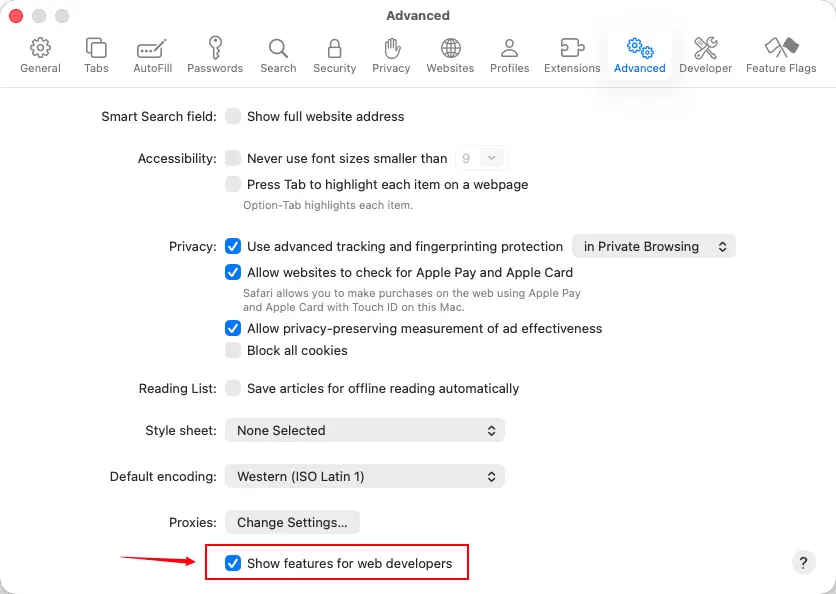
⚠️ Prerequisite: Enable Develop Menu
Before using the following methods, you need to enable the "Develop" menu in Safari browser:
1.Open Safari browser, click menu bar "Safari" → "Settings..." (or "Preferences")
2.Click the "Advanced" tab
3.Check the "Show feature for web developers" checkbox
💡 After enabling, the "Develop" option will appear in the menu bar for the following methods to work
1 Keyboard Shortcut Method
Press the following key combination to open the source code view:
View source directly:
⌘+Option+U
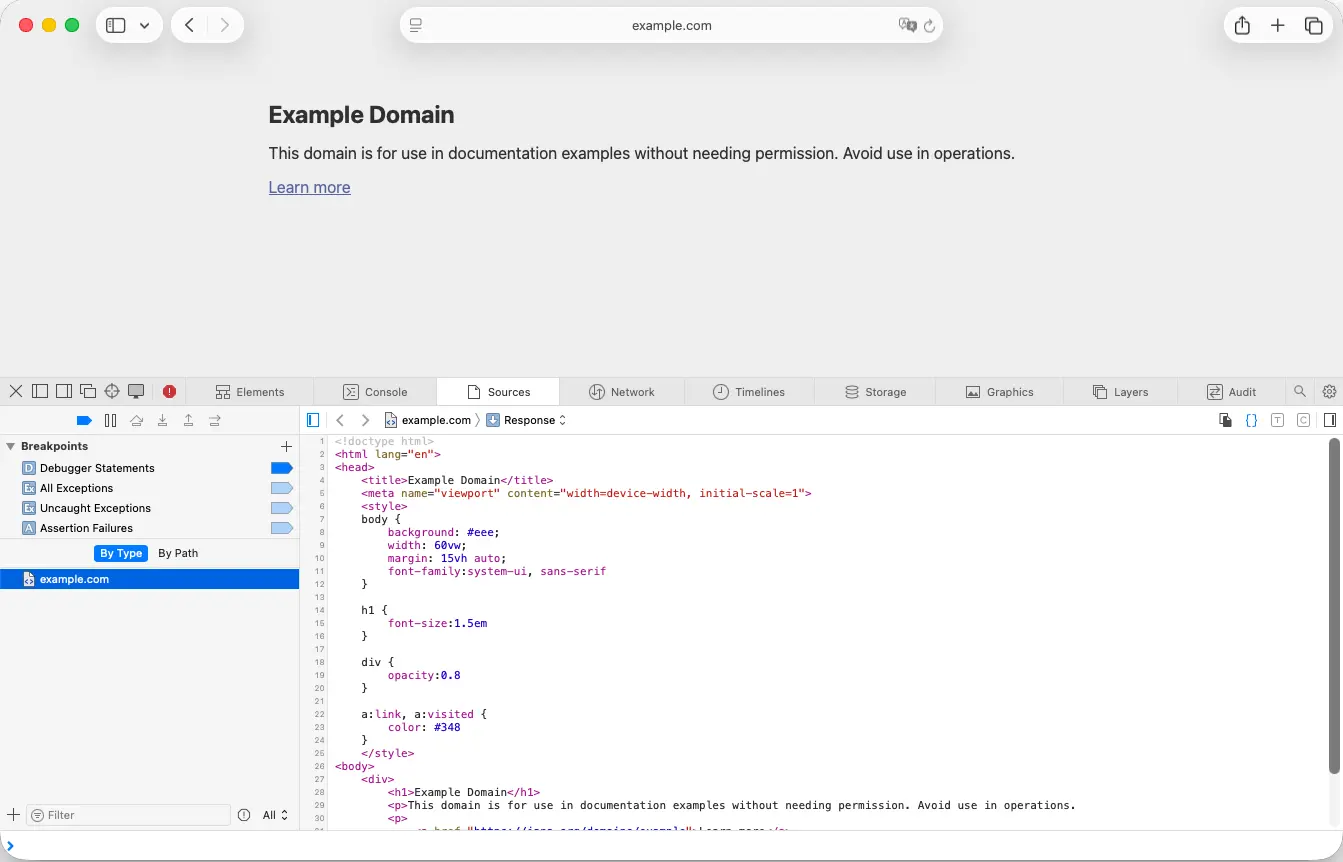
Open developer tools (includes source view):
⌘+Option+I
Demo Image (Development Phase)
2 Menu Bar Method
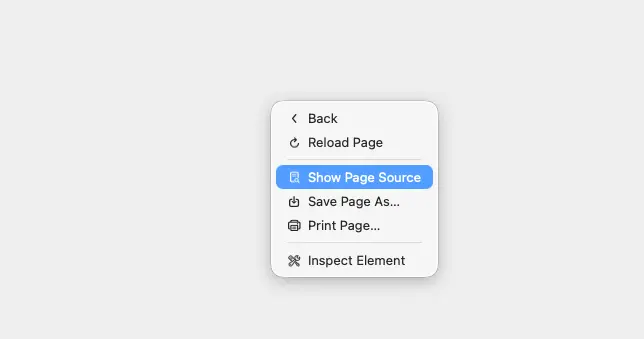
Quickly access page source through the right-click context menu
Right-click anywhere on the page → Select "Show Page Source"
Demo Image (Development Phase)
🌐
View Page Source in Chrome
Three methods to View Source in Google Chrome browser
1 Keyboard Shortcut Method
Windows/LinuxCtrl+U
macOS⌘+Option+U
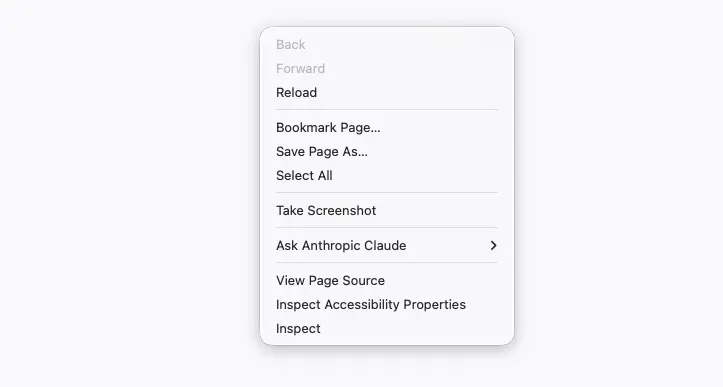
2 Right-Click Menu Method
→Right-click anywhere on the page
→Select "View page source"
Demo Image (Development Phase)
3 Menu Bar Method
→Click the three-dot menu in the top-right corner
→Select "More Tools"
→Click "View page source"
🦊
View Page Source in Firefox
Three methods to View Source in Mozilla Firefox browser
1 Keyboard Shortcut Method
Ctrl+U/⌘+U
2 Right-Click Menu Method
→Right-click anywhere on the page
→Select "View Page Source"
3 Menu Bar Method
→Click the three-line menu in the top-right corner
→Select "Web Developer"
→Click "Page Source"
Mobile Guide
How to View Page Source on Mobile
Complete guide to view source on Android and iPhone devices
📱
View Page Source on Android
Multiple methods to View Source on Android devices
🦊 Firefox Mobile
Firefox for Android supports direct source code viewing
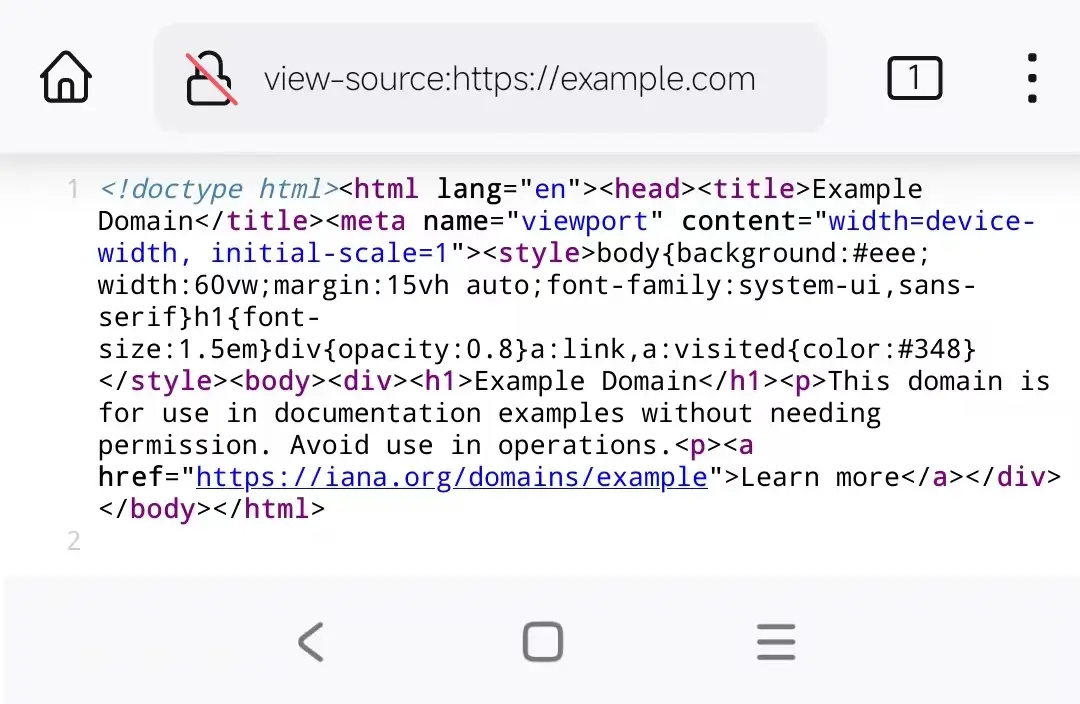
view-source:https://example.com
Simply enter view-source: followed by the URL in the address bar to view the page source
Demo Image (Development Phase)
🌐 Chrome
Chrome requires special URLs to access developer tools
view-source:https://example.com
Simply enter view-source: followed by the URL in the address bar to view the page source
Demo Image (Development Phase)
🧭 Safari & Other Browsers
Safari and other system-based browsers can try the view-source: method
view-source:https://example.com
Support depends on the device manufacturer and browser kernel, some customized systems may not support it
view-source: method not supported? Use our platform:
view-source.net/?q=https://example.com
🔧 Recommended Third-Party Tools
• HTML Source Viewer
• View Web Source
• Source Viewer
📲
View Page Source on iPhone
Complete guide to View Source on iPhone/iPad devices
🍎 Safari
Enable Web Inspector via Safari settings, then connect to Mac to view source
view-source:https://example.com
Due to iOS system restrictions, most browsers do not support the view-source: method
Recommended to use our platform:
view-source.net/?q=https://example.com
🌐 Chrome
Enter special URL in Chrome address bar
view-source:https://example.com
Due to iOS system restrictions, most browsers do not support the view-source: method
Recommended to use our platform:
view-source.net/?q=https://example.com
🦊 Firefox & Other Browsers
Firefox and other third-party browsers can try the view-source: method
view-source:https://example.com
Due to iOS system restrictions, most browsers do not support the view-source: method
Recommended to use our platform:
view-source.net/?q=https://example.com
Trusted by Professionals
See what developers, designers, and security experts say about View Source.
GL
Gary Lomas
Cyber Security Expert
"A website's source code is one of the first things you check if it appears to be hacked or acting odd. View Source makes this step fast and simple. Love it."
WP
Wendy Peters
Web Designer
"My work involves web design, nothing too technical. But when you find an inspirational design and wonder how they did it, this amazing source viewer helps me learn new techniques."
HJ
Harold Jay
Web Developer
"I use View Source to check the websites I create, just to make sure they work as intended. Highly recommended for any sort of web development."
Frequently Asked Questions
Find answers to common questions about viewing source and website analysis.
What is View Source?
With this HTML Viewer, you can View and analyze the source code of any live URL. It instantly fetches the code and provides comprehensive SEO analysis on any device - Mac, PC, tablet, or mobile.
What is HTML?
HTML stands for Hypertext Markup Language. It helps create structured sections, headings, paragraphs, blockquotes, and links for web pages and applications. It builds the bones of any webpage, forming the skeleton structure.
Why is viewing the source code necessary?
Viewing the source code is helpful for programming troubleshooting, SEO analysis, and educational purposes. Programmers use it to solve problems, SEO experts check meta tags and standards, and students learn how code works.
How do I view the source code?
On desktop, use "Ctrl + U" in your browser or right-click and select "View Page Source". On mobile devices, you can use this online HTML viewer tool - just enter the URL and click the "View Source" button.
Is my viewing history stored?
No, we don't store your queries or the source code you view. Your browsing history stays completely private.
Ready to Analyze Any Website?
Join millions of users who trust View Source for their website analysis needs.
 Safari
  Chrome
  Firefox
  Android
  iPhone